GHome - GHome Smart
3.74.70KReviews
Analysis ByAppCompare
I usually judge a smart-home app by what happens after the first week. Pairing a plug or lamp can feel satisfying, but the real question is whether the app still saves time once the novelty has gone. GHome Smart, developed by Shenzhen Gosund Technology Co., Ltd., is aimed at controlling GHome and NiteBird devices from one place. I found it most useful when I treated it as a quiet control panel rather than a gadget to open constantly.
It is a free lifestyle app for Android and iOS, with an Everyone age rating. The Android release works from version 7.0 onward, and the current version is 5.8.3. That broad compatibility makes it practical for households using older phones, although the experience still depends heavily on how smoothly your individual Gosund or NiteBird device connects.
What GHome Smart feels like during the first week
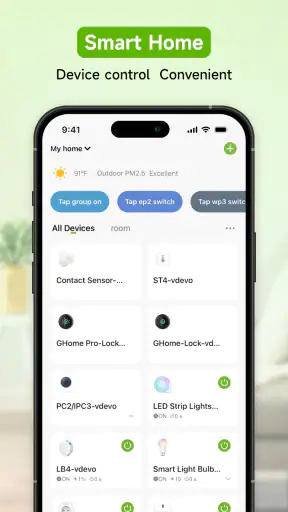
The initial appeal is straightforward: instead of reaching for several physical switches, I can use one app to manage compatible devices. That is particularly convenient when a device is behind furniture, installed in an awkward place, or shared by several people at home. The value is less about the app being exciting and more about reducing small interruptions.
A realistic example is an evening routine. I might turn on a NiteBird light before entering a dark room, adjust a connected device from the sofa, and then switch it off without walking around the house. None of those actions is dramatic on its own. Together, they make the app feel worthwhile when they happen repeatedly.
The store summary presents GHome Smart as a way to control GHome and NiteBird products more conveniently, and that description matches its practical role. It is not a general-purpose home-management platform that I would install without compatible hardware. Its usefulness begins with the devices already in your home, so prospective users should first check whether their particular products belong to the supported GHome or NiteBird family.
Setup is where patience matters. A smart-home app is only as pleasant as its pairing process, and wireless setup can be affected by the router, phone settings, signal strength, and the device itself. I would keep the phone close to the product, make sure the device is ready for pairing, and avoid trying to configure several products at once. That simple approach makes troubleshooting easier because I know which item caused a problem.
One useful habit is to give each device a clear name immediately. “Bedroom lamp” is more helpful than a model code when I am tired or controlling several items. Naming by location also reduces the chance of switching the wrong product, especially when multiple rooms contain similar plugs or lights. This is a small organizational choice, but it becomes important once the app stops being a novelty.
GHome Smart has attracted a sizeable audience, with over one million installs. Its average rating is 3.7 from around thirty-two thousand ratings, alongside roughly four thousand seven hundred written reviews. I read that combination as a sign of a useful but not universally effortless experience: many people can make it work, while others are likely running into device, network, or usability friction.
The difference between convenience and dependence
During the first few days, the app can make ordinary actions feel more modern. I can use my phone instead of searching for a remote or walking across the room. That convenience is strongest for devices used several times a day, such as bedside lighting or a frequently switched appliance.
It is weaker for products I rarely touch. If a device is used once a month, opening an app may be slower than using its physical control. This is an important trade-off: remote control only becomes a lasting benefit when the action is frequent, inconvenient, or needed from another room.
I also would not assume that putting every compatible product into the app automatically improves the home. A crowded device list can become harder to scan than a few physical switches. I prefer a small, deliberate setup with names that make sense, rather than adding devices simply because they can be added.
Why the value can survive beyond the novelty
After the first month, I judge GHome Smart by recurring routines. The app earns its place when it removes repeated effort without demanding repeated attention. A bedside light is a good example: if I use it every night, phone control becomes familiar. A rarely used decorative light is less convincing because the app adds another step to an action that was already simple.
The strongest long-term use case is shared convenience. A person who cannot easily reach a switch, someone settling a child, or anyone who wants to adjust a device from another room may benefit more than a user who simply enjoys trying new technology. In those situations, control from the phone is not just a novelty; it changes how the household handles a routine task.
Another practical insight is to separate “daily” devices from “occasional” devices mentally, even if the app does not offer the exact organization I want. Daily devices deserve clear names and an easy-to-find place in the app. Occasional products should not clutter the main mental workflow. This keeps the app useful without turning every household action into a screen interaction.
GHome Smart also makes more sense for people already invested in GHome or NiteBird hardware. If I were starting from zero and wanted a broad ecosystem with many brands, I would compare alternatives before buying devices. A brand-focused controller can be perfectly adequate, but it may feel limiting if my home already includes products from several manufacturers.
Compared with using each device’s own control method, the advantage is centralization. I do not need to remember a separate process for every compatible product. Compared with a broader smart-home platform, the likely advantage is a more direct relationship with the supported hardware, while the trade-off is less flexibility outside that ecosystem. For a small GHome or NiteBird setup, that balance can be sensible. For a mixed-brand home, I would investigate compatibility carefully before making it the main control layer.
What keeps the app useful from month to month
Recurring value comes from reducing decisions. If I can recognize a room name immediately and reach the device I need without searching, the app becomes part of a routine. If I must repeatedly rename items, reconnect products, or remember which control belongs to which device, the convenience starts to disappear.
I would also keep the phone and app reasonably current, while avoiding unnecessary changes to a setup that already works. Smart-home systems can become frustrating when users alter several variables at once. If a device stops responding, I would check the phone connection, the home network, and the device power before assuming the app itself is responsible. Testing one product at a time makes the cause easier to identify.
For households with more than one person, the real question is whether everyone understands the arrangement. A naming system based on room and purpose is more durable than names based on the person who installed the device. That way, the setup remains intelligible even when someone else needs to control it.
The free price removes a major barrier to trying it, but free does not mean frictionless. The continuing cost is attention: maintaining names, remembering which products are connected, and occasionally solving a connection issue. For a small installation, that burden is minor. For a growing collection, organization becomes just as important as the controls themselves.
Maintenance, friction, and the reasons fatigue appears
The maintenance burden is not usually the act of opening the app. It is everything around it. Devices need to remain powered, the network needs to be dependable, and the household needs to understand which product is being controlled. When those conditions are stable, the app can fade into the background. When they are not, every small failure feels more noticeable because the phone was supposed to simplify the task.
One source of fatigue is using an app for something that is already faster by hand. I would not replace every physical action with GHome Smart just for consistency. A switch beside the sofa may remain the better tool, while a device across the room is a stronger candidate for phone control. The best setup is selective rather than total.
Another source of fatigue is uncertainty. If I tap a control and nothing happens, I want to know whether the device is offline, the network is slow, or the command simply did not register. Any smart-home app can feel unreliable when feedback is unclear. This is why I would test important routines before depending on them, especially if a light or device needs to be controlled at a particular moment.
There is also a social maintenance problem. A setup that makes perfect sense to its installer may confuse everyone else. If guests or family members cannot tell which item is which, they may stop using the app altogether. Clear labels and a simple device list are not cosmetic details; they determine whether the system becomes shared infrastructure or remains one person’s project.
Users should also keep expectations realistic. GHome Smart is a controller for compatible GHome and NiteBird products, not a reason by itself to buy hardware. It will not make an incompatible device part of the ecosystem, and it is not the right choice for someone seeking a single universal dashboard without checking brand support first.
Who should use it, and who should skip it
I would recommend it to someone who owns compatible GHome or NiteBird devices and wants a straightforward way to manage them from a phone. It is especially suitable when the products are used often, installed in inconvenient places, or shared across a household. The free entry point also makes experimentation relatively easy.
I would be more cautious for a person who dislikes troubleshooting wireless devices or wants every smart-home product to work together under one broad standard. That user may prefer a platform chosen first for cross-brand compatibility, even if it means changing hardware or learning a different control system.
I would also skip it if the intended setup contains only one rarely used device with an easy physical switch. In that case, the app may add maintenance without delivering meaningful time savings. Smart-home control is most convincing when it removes a repeated inconvenience, not when it simply adds another way to perform an easy action.
For older Android phones, the minimum operating-system requirement of 7.0 is reassuring, but compatibility with the phone does not guarantee a perfect pairing experience. The device, router, and app all play a role. I would check the exact product instructions before purchasing hardware, rather than assuming that every GHome or NiteBird item behaves identically.
My long-term verdict on GHome Smart
After the initial excitement fades, I think GHome Smart earns lasting space when it is attached to a small number of genuinely useful devices. Its strongest quality is practical centralization: compatible GHome and NiteBird products can be managed from one lifestyle app instead of treated as isolated gadgets. That is enough to improve everyday routines, particularly when control from a phone is more convenient than reaching the hardware.
Its weakness is equally practical. The app cannot remove all the maintenance involved in a smart-home setup. Naming, connectivity, device compatibility, and household habits still matter. If the system grows without organization, the convenience can turn into a list of confusing controls. I would rather have a few dependable entries than a large collection that I rarely use.
The audience size suggests that the app is established enough to be a realistic option, while the middling average rating reminds me not to treat setup as universally smooth. My own recommendation is conditional but positive: use it when your hardware already belongs to the GHome or NiteBird ecosystem and the phone-based control solves a real recurring problem.
My bottom line is simple: GHome Smart is worth keeping when it becomes a quiet daily shortcut, not when it is merely another smart-home app to check. If your devices are compatible, your routines are clear, and you keep the setup modest, the free app can continue paying off long after the first-week novelty disappears. If you want a broad mixed-brand system or rarely need remote control, a different platform—or a physical switch—may serve you better.
FAQ
What is GHome - GHome Smart used for?
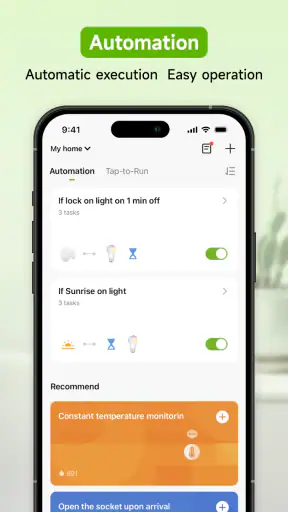
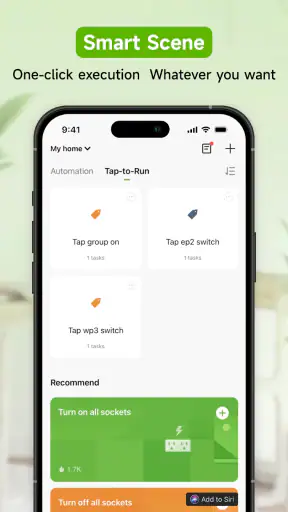
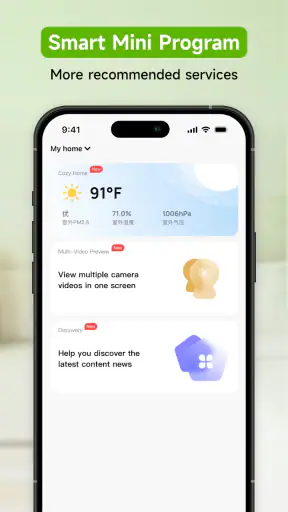
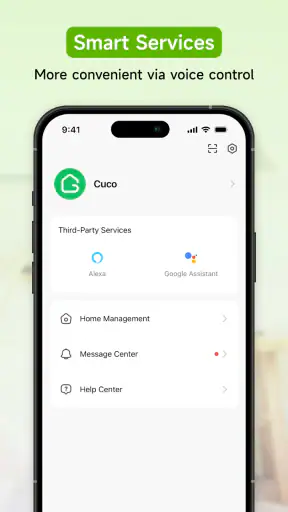
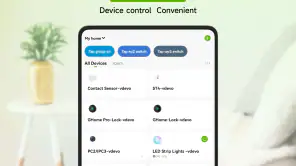
GHome - GHome Smart is a companion app for managing compatible smart-home devices from a mobile phone. Depending on the supported product, it can help you connect devices to Wi-Fi, control them remotely, adjust settings, create schedules, and organize several products in one place. Its exact functions depend on the device model and the features provided by the manufacturer.
Which devices are compatible with GHome - GHome Smart?
Compatibility is not universal, so you should check the product description or user manual before downloading the app. GHome - GHome Smart is generally intended for supported smart-home products that use the GHome platform, but available controls may differ between devices. Some appliances may offer remote power control and scheduling, while others can include modes, timers, status information, or additional automation options.
How do I connect a device to GHome - GHome Smart?
After installing GHome - GHome Smart, you normally need to create or sign in to an account, enable the required permissions, and add your compatible device from the app. The device usually must be placed into pairing mode and connected to a supported Wi-Fi network. Follow the instructions shown in the app, and keep your phone close to the device during setup for a more reliable connection.
Does GHome - GHome Smart require an internet connection?
An internet connection is usually required for the initial setup, account access, remote control, firmware-related functions, and communication with cloud-connected devices. Your phone also needs a stable connection while pairing, and the appliance must remain connected to Wi-Fi. Some basic controls may work locally in certain configurations, but offline availability can vary by device, network setup, and app version.
Is GHome - GHome Smart safe and easy to use?
The app is designed to make compatible smart-home products easier to control, with guided pairing and centralized device management. However, users should review the permissions requested, use a strong account password, and keep both the app and device firmware updated. Because connected appliances may be controlled remotely, secure Wi-Fi settings and careful account sharing are important for protecting access to your home devices.
Pros
- Simple setup for compatible smart-home devices
- Remote control is convenient when away from home
- Supports centralized management of multiple devices
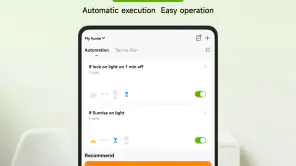
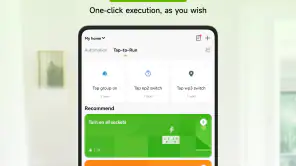
- Useful automation and scheduling options
- Clean interface makes basic controls easy to find
Cons
- Compatibility may vary by device
- region
- and firmware
- Some features require a stable internet connection
- Account registration may be needed for full access
- Notifications can feel inconsistent on some devices
- Advanced settings may be difficult for beginners